
Jest
By ensuring your tests have unique global state, Jest can reliably run tests in parallel. To make things quick, Jest runs previously failed tests first and re-organizes runs based on how long test files take.
jestjs.io
C:\Users\knew\Documents\20211104\jest-test>npm init
This utility will walk you through creating a package.json file.
It only covers the most common items, and tries to guess sensible defaults.

See `npm help init` for definitive documentation on these fields
and exactly what they do.

Use `npm install <pkg>` afterwards to install a package and
save it as a dependency in the package.json file.

Press ^C at any time to quit.
package name: (jest-test)
version: (1.0.0)
description:
entry point: (index.js)
test command: jest --watch
git repository:
keywords:
author:
license: (ISC)
About to write to C:\Users\knew\Documents\20211104\jest-test\package.json:

{
  "name": "jest-test",
  "version": "1.0.0",
  "description": "",
  "main": "index.js",
  "scripts": {
    "test": "jest --watch"
  },
  "author": "",
  "license": "ISC"
}


Is this OK? (yes)

C:\Users\knew\Documents\20211104\jest-test>npm install --save-dev jest

added 327 packages, and audited 328 packages in 3s

24 packages are looking for funding
  run `npm fund` for details

found 0 vulnerabilities

C:\Users\knew\Documents\20211104\jest-test>npm run test

> jest-test@1.0.0 test
> jest --watch
Determining test suites to run...
--watch is not supported without git/hg, please use --watchAll

C:\Users\knew\Documents\20211104\jest-test>npm run test

> jest-test@1.0.0 test
> jest --watchAll
No tests found, exiting with code 0

Watch Usage
 › Press f to run only failed tests.
 › Press o to only run tests related to changed files.
 › Press p to filter by a filename regex pattern.
 › Press t to filter by a test name regex pattern.
 › Press q to quit watch mode.
› Press Enter to trigger a test run.책과 다르게 --wacthAll 로 변경처리하니 정상적으로 된다.
index.js
const sum = (a,b) => {
   return a+b;
};

module.exports = {
   sum,
};
index.test.js
const { sum } = require('./index');

describe('test index.js file', () => {
	test('adds 1 + 2 to equal 3', () => {
	  expect(sum(1, 2)).toBe(3);
	});
});
다시 npm run test 하면
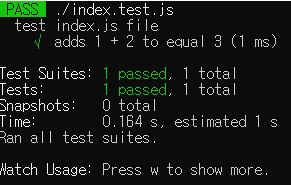
index.js 에서 + 를 * 변경하면

index.js
const sum = (a,b) => {
   return a+b;
};

const person = (name, age) => {
	return {
		name,
		age,
	};
};

const toggle = (a) => {
	return !a;
};

const range = (start, end) => {
	let result = [];
	for (let i = start; i <= end; i++){
		result.push(i);
	}
	return result;
};

module.exports = {
   sum,
   person,
   toggle,
   range,
};
index.test.js
const { sum, person, toggle, range } = require('./index');

describe('test index.js file', () => {
	test('adds 1 + 2 to equal 3', () => {
	  expect(sum(1, 2)).toBe(3);
	});
});

describe('test index.js file', () => {
	test('makes a person', () => {
	  expect(person('Kim', 20)).toEqual({
		name : 'Kim',
		age : 20,
	  });
	});
});

describe('test index.js file', () => {
	test('return false', () => {
	  expect(toggle(true)).toBeFalsy();
	  expect(toggle(true)).not.toBeTruthy();
	});
});

describe('test index.js file', () => {
	test('has 2', () => {
	  expect(range(1,3)).toContain(2);
	});
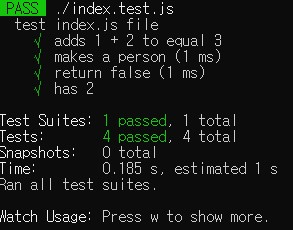
});
https://jestjs.io/docs/using-matchers
Using Matchers · Jest
Jest uses "matchers" to let you test values in different ways. This document will introduce some commonly used matchers. For the full list, see the expect API doc.
jestjs.io
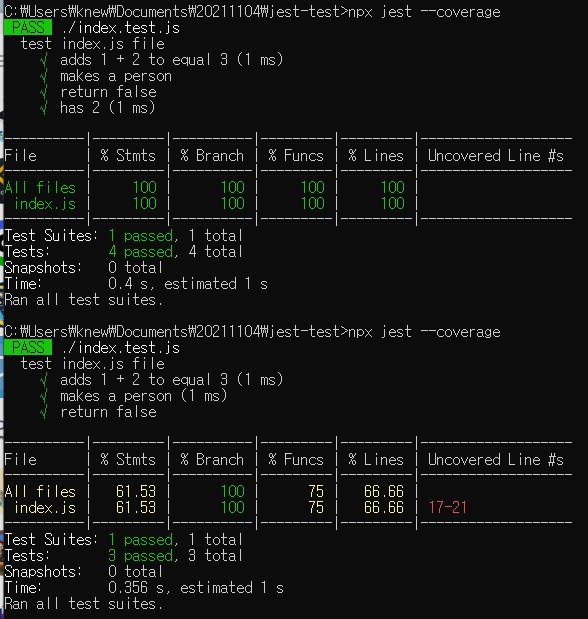
npx jest --coverage테스트 대상이 되는 소스 코드 중 테스트 코드를 통해 검증된 코드의 비율을 의미하며, 테스트 수행 결과를 정량적으로 나타내는 수치이다.
위 결과는 모두 테스트한경우
아래 결과는 테스트 마지막 한개를 주석처리한경우
반응형
'2022 > 리액트+TDD(完)' 카테고리의 다른 글
| TypeScript 적용2 - style-components (0) | 2022.01.04 |
|---|---|
| TypeScript 적용1 (0) | 2022.01.03 |
| 리액트 테스트 도구 - react-testing-library (0) | 2021.11.05 |
| 실습환경 (0) | 2021.11.04 |
| 리액트의 특징 (0) | 2021.11.04 |
